# Blurred Backgrounds Mod
**URL:** https://community.revolutionarygamesstudio.com/t/blurred-backgrounds-mod/204
**Category:** Modding
**Tags:** graphics-mod
**Created:** [March 13, 2018, 3:45am UTC](https://community.revolutionarygamesstudio.com/t/blurred-backgrounds-mod/204 "2018-03-13T03:45:03Z")
**Posts on this page:** 6
**Page:** 1
### Author:  [@NickTheNick](https://community.revolutionarygamesstudio.com/u/NickTheNick)
#### Post date: [March 13, 2018, 3:45am UTC](https://community.revolutionarygamesstudio.com/t/blurred-backgrounds-mod/204/1 "2018-03-13T03:45:03Z")
This mod works for most current versions of Thrive as they all use a similar format of organizing the background files. This thread is copied over from the previous forum.
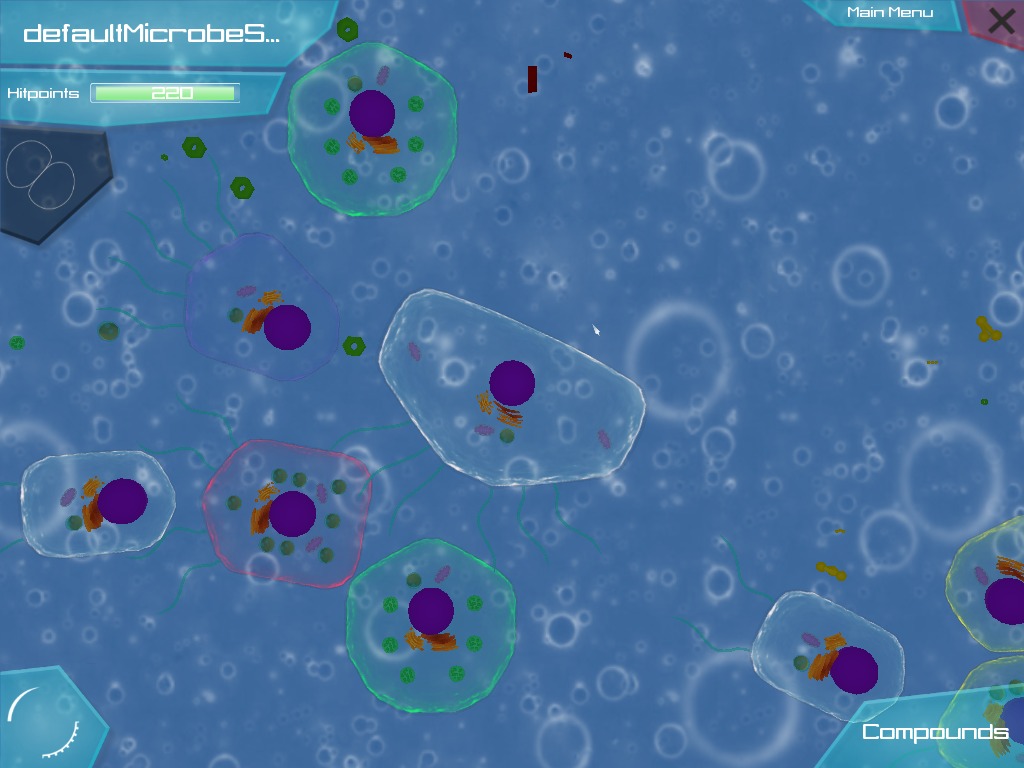
After some discussion on Slack and on the development forums here ([http://forum.revolutionarygamesstudio.com/t/improving-thrives-visuals/311](http://forum.revolutionarygamesstudio.com/t/improving-thrives-visuals/311)), I decided to try to have a go to manually add some blur to the backgrounds in Thrive. I think it helps a lot, and so I’m putting the download here for anyone who wants to see what it’s like. I added blur for the original, shallow (blue-green), and vent (red-grey) biomes, but not the abyss which was hard to work with.
Here are some pictures of the difference.
> **Original Ocean Biome**
>
> 
> **Original Shallows/Tidepool Biome**
>
> 
> **Blurred Ocean Biome**
>
> 
> **Blurred Shallows/Tidepool Biome**
>
> 
INSTALLATION
1. Download this: [http://www.mediafire.com/file/fohhettx3l97et6/Blurred\_Backgrounds.rar](http://www.mediafire.com/file/fohhettx3l97et6/Blurred_Backgrounds.rar)
2. Make a backup of your “background” folder. For me the path looks like:
C:\Users\Nick\Desktop\Thrive\0.3.3\Thrive\materials\textures\background
Basically, go to the Thrive directory, go into materials, textures, and backup the folder there called background.
3. After you have backed up your background folder (in case you ever want to revert to the original backgrounds without redownloading the whole game) copy the folder from the mod (called “materials”) into the Thrive directory and replace so that it merges with the original materials folder. Say yes to overwriting any original files.
4. You’re done! Boot up the game and play.
---
### Author:  [@Louix](https://community.revolutionarygamesstudio.com/u/Louix)
#### Post date: [March 13, 2018, 1:56pm UTC](https://community.revolutionarygamesstudio.com/t/blurred-backgrounds-mod/204/2 "2018-03-13T13:56:04Z")
Great! I love that we have mods that are easy for me to download now !
---
### Author:  [@Darwin](https://community.revolutionarygamesstudio.com/u/Darwin)
#### Post date: [March 13, 2018, 8:42pm UTC](https://community.revolutionarygamesstudio.com/t/blurred-backgrounds-mod/204/3 "2018-03-13T20:42:15Z")
It does feel much nicer to play with this mod, and it’s easy to focus on your cell and surroundings.
---
### Author:  [@Darwin](https://community.revolutionarygamesstudio.com/u/Darwin)
#### Post date: [March 13, 2018, 11:47pm UTC](https://community.revolutionarygamesstudio.com/t/blurred-backgrounds-mod/204/4 "2018-03-13T23:47:55Z")
BTW you can use this link with dThriveLauncher that I’ve made to avoid hassling with the game files and also to avoid the need of creating a backup.
`https://download794.mediafire.com/l06q5i2ye4cg/9sfz7gan0joud94/Blurred+BG+Mod.zip`
Copy the link basically (this would go where it says “insert link”).
---
### Author:  [@Darwin](https://community.revolutionarygamesstudio.com/u/Darwin)
#### Post date: [March 20, 2018, 8:20pm UTC](https://community.revolutionarygamesstudio.com/t/blurred-backgrounds-mod/204/5 "2018-03-20T20:20:02Z")
Oh yeah, the link may require you to get a new key (it’s just how mediafire works) so you might have to click this link, then where it shows Download on a green button, right click and open link in new tab, then copy that link. Remember the links you need to use have this **“download(some number).mediafire.com/something”** format (at least from mediafire).
---
### Author:  [@Untrustedlife](https://community.revolutionarygamesstudio.com/u/Untrustedlife)
#### Post date: [June 19, 2018, 6:10pm UTC](https://community.revolutionarygamesstudio.com/t/blurred-backgrounds-mod/204/6 "2018-06-19T18:10:21Z")
I do suggest people try this mod, (though hopefully 0.4.0 will have totally new biome backgrounds)