# Mod Installer Tool - Updated!
**URL:** https://community.revolutionarygamesstudio.com/t/mod-installer-tool-updated/1560
**Category:** Modding
**Created:** [March 2, 2019, 4:21pm UTC](https://community.revolutionarygamesstudio.com/t/mod-installer-tool-updated/1560 "2019-03-02T16:21:00Z")
**Posts on this page:** 14
**Page:** 1
### Author:  [@productive](https://community.revolutionarygamesstudio.com/u/productive)
#### Post date: [March 2, 2019, 4:21pm UTC](https://community.revolutionarygamesstudio.com/t/mod-installer-tool-updated/1560/1 "2019-03-02T16:21:01Z")
Hey guys,
I updated the mod installer tool to 1.4.2, now the new list of features is:
- Create, manage, re-install backups
- [Generate](https://github.com/Productive2/Thrive-Mod-Installer/wiki/ModGen) and install mods
- Mod and backup store
- Cross-mod compatibility
- [Cerium](https://github.com/Productive2/Thrive-Mod-Installer/wiki/Cerium) scripting to make mod install simpler
- One-file mods for mods that only modify scripts
- Extensive logging and options to make the logs more readable
- MIT License, open source, view the source here: [https://github.com/Productive2/ThriveModInstallerSource](https://github.com/Productive2/ThriveModInstallerSource)
- Better installer
Download here: [https://github.com/Productive2/Thrive-Mod-Installer/releases](https://github.com/Productive2/Thrive-Mod-Installer/releases)
Wiki: [https://github.com/Productive2/Thrive-Mod-Installer/wiki](https://github.com/Productive2/Thrive-Mod-Installer/wiki)


How to setup?
Get the latest release and install.
Find your thrive install path (for me: C:\Users\username\AppData\Roaming\Revolutionary-Games\Launcher\Installed\Thrive-0.4.0.2-WINDOWS-64bit\Thrive-0.4.0.2-WINDOWS-64bit), make sure it’s the inner one (the one that directly contains bin), and insert it into the “Thrive path” textbox (the upper one).
This path is your “install path”.
Enter the path that you would like Thrive Mod Installer to save the files to. It’s recommended that it’s either an empty folder or one that doesn’t exist. (for me: C:\Users\username\Documents\ThriveMods)
This path is your “files path”.
When confronted with warnings, read it carefully to make sure that the path is correct, then press Yes to confirm.
The rest should hopefully come to you naturally.
If you want your mod added to the mod store, check out the corresponding change in the wiki.
Have a nice day,
Productive
---
### Author:  [@hhyyrylainen](https://community.revolutionarygamesstudio.com/u/hhyyrylainen)
#### Post date: [March 2, 2019, 9:13pm UTC](https://community.revolutionarygamesstudio.com/t/mod-installer-tool-updated/1560/2 "2019-03-02T21:13:44Z")
This is really cool. I didn’t think that someone would make something like this so soon.
I really wanted to have a look at your source code but it looks like you didn’t put that on Github.
---
### Author:  [@productive](https://community.revolutionarygamesstudio.com/u/productive)
#### Post date: [March 3, 2019, 6:41am UTC](https://community.revolutionarygamesstudio.com/t/mod-installer-tool-updated/1560/3 "2019-03-03T06:41:59Z")
> [@hhyyrylainen](#):
>
> I really wanted to have a look at your source code but it looks like you didn’t put that on Github.
Yes, I didn’t put it there, because I don’t know how to integrate Visual studio with github properly (haven’t done it before).
Currently I am rewriting most of the code, and I am not using a version control (yet), so I don’t have a functional version of the source code right now. But I see no problems in uploading the code to github the next version, I might learn how to do it.
---
### Author:  [@QuantumCrab](https://community.revolutionarygamesstudio.com/u/QuantumCrab)
#### Post date: [March 3, 2019, 8:38am UTC](https://community.revolutionarygamesstudio.com/t/mod-installer-tool-updated/1560/4 "2019-03-03T08:38:21Z")
This mod installer is sure to prevent a lot of pain down the line, so I salute you!
---
### Author:  [@productive](https://community.revolutionarygamesstudio.com/u/productive)
#### Post date: [March 3, 2019, 9:08am UTC](https://community.revolutionarygamesstudio.com/t/mod-installer-tool-updated/1560/5 "2019-03-03T09:08:23Z")
Okay, here is the source code: [https://github.com/Productive2/ThriveModInstallerSource](https://github.com/Productive2/ThriveModInstallerSource)
But be aware that it’s still in the middle of a rewrite, I want to move everything that’s not GUI to its own thread very soon.
---
### Author:  [@productive](https://community.revolutionarygamesstudio.com/u/productive)
#### Post date: [March 12, 2019, 9:46pm UTC](https://community.revolutionarygamesstudio.com/t/mod-installer-tool-updated/1560/6 "2019-03-12T21:46:52Z")
I did a new update, changelog:
Additions:
- Mod store
- Mod generator tool
- Cerium version 1
- Extract scripts folder to create a new backup
- Duplicate backup
- Zip support (Modzips and Backupzips folders, click Refresh to do the unzipping to mods/backups)
- Mod installer now uses third party libraries for JSON, Zip and Diff support, please view License.txt for more detail
Changes:
- A lot of refresh fixes
- ScriptMerge is still supported, but Cerium is the better alternative
- License changed, find license.txt for detail
Removals:
- Setup files button (setup was simplified)
- Splitter
Edit: The installer in version 1.4.1 should be improved, try that one. (edited after Evolution4weak posted the crash)
> **[Productive2/Thrive-Mod-Installer](https://github.com/Productive2/Thrive-Mod-Installer/releases)**
>
> Read this first:. Contribute to Productive2/Thrive-Mod-Installer development by creating an account on GitHub.
Edit2: for future reference, version 1.4’s installer got broken (probably) because github replaced line endings in the .exe to make it consistent (or another trivial change) and the hash hence didn’t match, hence installation was blocked.
---
### Author:  [@Evolution4Weak](https://community.revolutionarygamesstudio.com/u/Evolution4Weak)
#### Post date: [March 13, 2019, 2:40am UTC](https://community.revolutionarygamesstudio.com/t/mod-installer-tool-updated/1560/7 "2019-03-13T02:40:39Z")
It says
> application verification failed can not continue
when i try to install it.(using your link)
---
### Author:  [@productive](https://community.revolutionarygamesstudio.com/u/productive)
#### Post date: [March 13, 2019, 6:59am UTC](https://community.revolutionarygamesstudio.com/t/mod-installer-tool-updated/1560/8 "2019-03-13T06:59:11Z")
> [@Evolution4Weak](#):
>
> It says
>
> > application verification failed can not continue
>
> when i try to install it.(using your link)
It does not happen for me, I’m unable to reproduce it. Can you please provide more details? (Screenshot, log?)
Edit: I created a new installer, hopefully a better one than the auto-generated one. You can find it under version 1.4.1: [https://github.com/Productive2/Thrive-Mod-Installer/releases](https://github.com/Productive2/Thrive-Mod-Installer/releases)
Let me know if this new installer has the same issues
Edit2: not sure if you already read this, but there is a new patch that improves the mod store. Go get 1.4.2
---
### Author:  [@Evolution4Weak](https://community.revolutionarygamesstudio.com/u/Evolution4Weak)
#### Post date: [March 13, 2019, 3:05pm UTC](https://community.revolutionarygamesstudio.com/t/mod-installer-tool-updated/1560/9 "2019-03-13T15:05:28Z")
It does install now!
---
### Author:  [@Evolution4Weak](https://community.revolutionarygamesstudio.com/u/Evolution4Weak)
#### Post date: [March 17, 2019, 7:42pm UTC](https://community.revolutionarygamesstudio.com/t/mod-installer-tool-updated/1560/10 "2019-03-17T19:42:47Z")
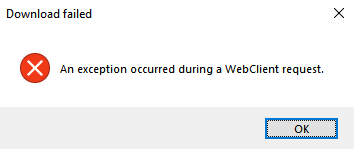
when i tried installing a mod using The Mod Store I get This Error:
edit:
also i tried to install a mod i made that was using cerium script
and it just froze and crash
---
### Author:  [@productive](https://community.revolutionarygamesstudio.com/u/productive)
#### Post date: [March 19, 2019, 5:44am UTC](https://community.revolutionarygamesstudio.com/t/mod-installer-tool-updated/1560/11 "2019-03-19T05:44:40Z")
I am sorry to hear that you have issues with using this tool ☹
Web client:
It does those things when the links/security codes are invalid.
If you could tell which mod did you try to install, it would be great. I checked some of the links, and the pastebin links are definitely correct.
Mod:
For the mod/cerium generation, can you please give me more details? When did it froze/crash? During mod generation? Mod installation? Did Thrive freeze and crash? Can you send me the last logs from mod installer and/or thrive, also the generated cerium files please?
EDIT2: I patched thrive mod installer [https://github.com/Productive2/Thrive-Mod-Installer/releases/tag/v1.4.3](https://github.com/Productive2/Thrive-Mod-Installer/releases/tag/v1.4.3)
The new version now opens a dialog with more info and the possibility to email me a screenshot, logs and error details when crashes occur. if you were so kind, could you please repeat what you did to get the error message (the web client one), and send me the crash report (if it is a crash that was handled, it should open a dialog).
If you are interested in the cerium thing fixed, the above still applies, but you can send me the logs very easily by clicking the button below the logs in the new version. I would love to have a look at both the “Generate mod” logs and the “Install backup with mods” logs.
---
### Author:  [@tccasanova](https://community.revolutionarygamesstudio.com/u/tccasanova)
#### Post date: [March 23, 2020, 10:16pm UTC](https://community.revolutionarygamesstudio.com/t/mod-installer-tool-updated/1560/12 "2020-03-23T22:16:48Z")
It’s a 404? There’s nothing there.
---
### Author:  [@Underfish](https://community.revolutionarygamesstudio.com/u/Underfish)
#### Post date: [April 10, 2020, 8:59pm UTC](https://community.revolutionarygamesstudio.com/t/mod-installer-tool-updated/1560/13 "2020-04-10T20:59:26Z")
You’re gonna need to make an entirely new page for that mod installer
---
### Author:  [@muppi](https://community.revolutionarygamesstudio.com/u/muppi)
#### Post date: [September 2, 2021, 9:02am UTC](https://community.revolutionarygamesstudio.com/t/mod-installer-tool-updated/1560/14 "2021-09-02T09:02:56Z")
> [@productive](#):
>
> > [@](#):
> >
> > It says
> >
> > > > application verification failed can not continue
> > >
> > > when i try to install it.(using your link)
>
> It does not happen for me, I’m unable to reproduce it. Can you please provide more details? (Screenshot, log?)
>
> Edit: I created a new installer, hopefully a better one than the auto-generated one. You can find it under version 1.4.1: [https://github.com/Productive2/Thrive-Mod-Installer/releases](https://github.com/Productive2/Thrive-Mod-Installer/releases)
> Let me know if this new installer has the same issues
>
> Edit2: not sure if you already read this, but there is a new patch that improves the mod store. Go get 1.4.2
when I click on the link i recieve 404 error